bela salt granular sampler
CV-controlled granular synthesis for Bela Salt and Salt+
A granular sampler that records audio into a 10-second circular buffer, then spawns up to 32 simultaneous grains with independent position, size, pitch, panning, and envelope shape. Built for the Bela Salt and Salt+ Eurorack modules.
Eight parameters, all controllable via panel knobs and CV inputs: position, size, density, pitch, spray, spread, shape, and dry/wet. Every parameter responds to voltage. Patch it into your system and let it breathe.
Freeze the buffer to lock a texture in place while grains keep spawning from the frozen material. Unfreeze to let new audio flow in. The transition between live and frozen is where things get interesting.
Real-time safe C++ implementation optimized for the Bela platform's constraints. No dropouts. No glitches (unless you want them).
Free and open source. Requires a Bela Salt or Salt+ module.
panel layout
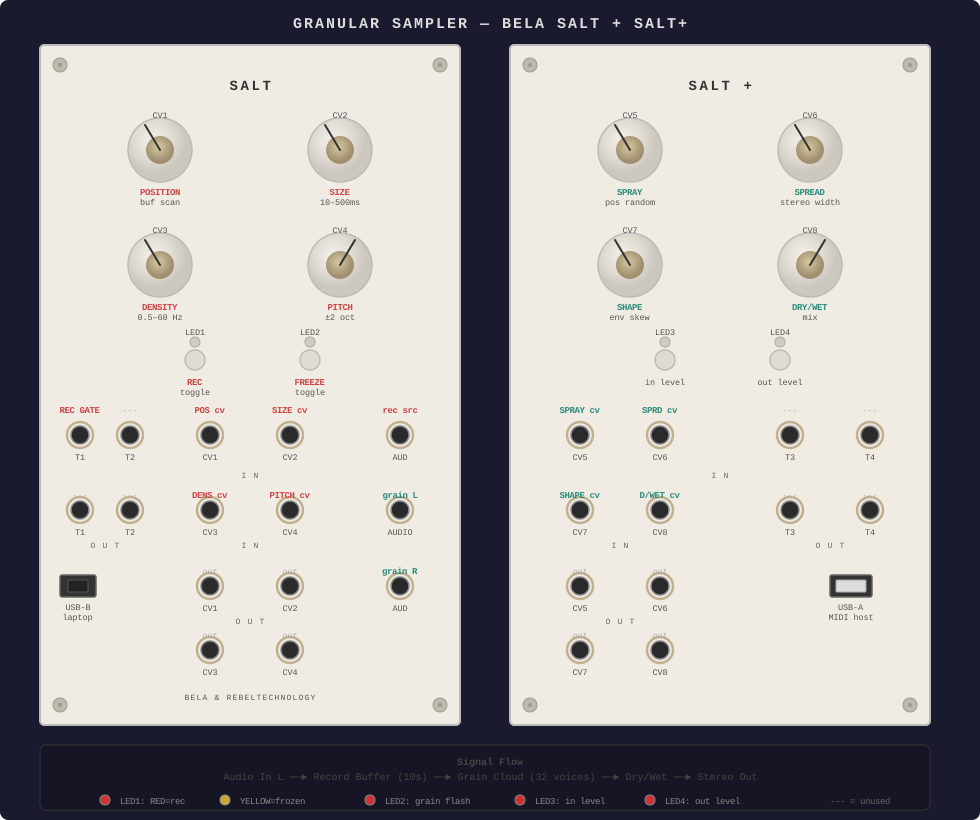
parameters
| Knob | Parameter | Range |
|---|---|---|
| CV1 | Position — where in the buffer grains read from | 0–100% of buffer |
| CV2 | Size — grain duration | 10–500ms |
| CV3 | Density — grain spawn rate | 0.5–60 Hz |
| CV4 | Pitch — grain playback speed | ±2 octaves |
| CV5 | Spray — random offset added to grain position | 0 to full buffer |
| CV6 | Spread — stereo width of grain placement | 0 (mono) to 1 (full) |
| CV7 | Shape — grain envelope attack/decay ratio | 0 (decay) to 1 (attack) |
| CV8 | Dry/Wet — mix between input and grain output | 0 (dry) to 1 (wet) |
buttons
BTN1 (Salt)
Record toggle — start/stop recording to buffer
BTN2 (Salt)
Freeze toggle — lock buffer contents, stop recording
BTN3 (Salt+)
LED3: input level indicator
BTN4 (Salt+)
LED4: output level indicator
LEDs
LED1
RED = recording, YELLOW = frozen, OFF = idle
LED2
RED flash on each grain spawn
LED3
Input level (RED = signal, YELLOW = hot)
LED4
Output level (RED = signal, YELLOW = hot)
getting started
Deploy
- Connect Salt to your laptop via USB
- Open
http://bela.localin a browser (~40s boot time, wait for heartbeat LED) - Create a new project in the Bela IDE
- Drag
render.cppinto the project - Click Run
Perform
- Press BTN1 to start recording (LED1 turns red)
- Feed audio into Audio IN — it records into a 10-second circular buffer
- Grains begin spawning as soon as enough audio is recorded
- Twist knobs to shape the grain cloud
- Press BTN2 to freeze the buffer (LED1 turns yellow) — grains play from a static snapshot
- Press BTN2 again to unfreeze and resume recording
- Long-press BTN4 (Salt+) or power cycle to clear the buffer
patch ideas
Frozen texture pad
Record a few seconds, freeze, sweep Position slowly, high Density + medium Size
Glitch stutter
Short Size, high Density, no Spray — tight rhythmic granulation
Ambient wash
Long Size, low Density, high Spray + Spread — diffuse stereo cloud
Pitch shimmer
Pitch slightly above/below center — detuned chorus effect
Modulated scan
Patch an LFO into CV1 to auto-scan through the buffer